Real-Time Telegram Trading Alerts: Never Miss a Trade Update Again

You cannot watch your trades 24 hours a day. But Telegram can notify you the instant something critical happens — from TP hits to structure breaks to AI exit recommendations. Here is how to set it up.

Why Real-Time Alerts Change Everything

There is a fundamental problem with trade monitoring: you cannot stare at a dashboard all day. You have a job, responsibilities, sleep, and a life outside of trading. Yet the crypto market moves 24/7, and the difference between catching a structure break early and discovering it hours later can be thousands of dollars.

This is exactly why ChartsTrack built a comprehensive Telegram notification system directly into the AI trade monitoring engine. Every critical event during your trade — from the moment entry is confirmed to the final exit — triggers an instant alert delivered straight to your Telegram. No checking the dashboard obsessively. No setting random alarms to peek at charts. The AI watches, and Telegram tells you when something matters.

The result is a fundamentally different trading experience. You enter a trade, set your parameters, and go about your day. When TP1 hits and profit is locked, your phone buzzes. When the AI detects a structural shift that threatens your position, you know immediately. When the trade completes at TP2 or gets stopped out, you get the full summary. It is automated trade management meets real-time communication.

TP1 ALERT

TP1 Hit: Profit Locked Notification

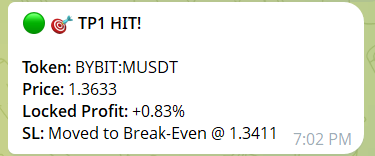
When price reaches your first take-profit target, ChartsTrack sends an immediate Telegram alert with full details. The notification includes the token pair, direction, entry price, TP1 level, and the exact percentage of profit locked on the first 50% of your position.

This is one of the most satisfying alerts you will receive. It means your analysis was correct, the trade moved in your direction, and half your position is already in profit. The remaining 50% continues running toward TP2 with your stop-loss now moved to breakeven — eliminating all downside risk.

  • Instant delivery — notification within seconds of TP1 being hit
  • Profit confirmation — shows exact locked P&L percentage
  • Risk update — confirms SL moved to breakeven
Telegram alert showing TP1 hit with profit locked notification for crypto trade
STRUCTURE BREAK

Structure Break Warning: Early Detection

This is arguably the most valuable alert in the entire system. When ChartsTrack's AI detects a structural change in the market — a break of market structure, a major trendline violation, or a significant shift in momentum — it sends a warning alert BEFORE the damage is done.

Most traders only discover structural breaks after the fact, when they check their portfolio and see an unexpected loss. With real-time Telegram trading alerts, you get the information when it actually matters: while you still have time to react. The AI explains what broke, why it matters, and whether you should consider exiting or adjusting your position.

  • Proactive warning — alerts before major moves against your position
  • AI explanation — tells you what changed and why it matters
  • Actionable advice — HOLD, EXIT, or MOVE_SL recommendation
Telegram structure break warning alert detecting market shift before losses

All 7 Alert Types Explained

ChartsTrack monitors every phase of your trade and sends targeted notifications for each critical event.

Every Telegram alert follows a consistent, clean format that includes the token pair, trade direction (LONG/SHORT), and the specific event details. Here is what each alert type covers and when you can expect to receive it:

1. Entry Confirmation

Sent when your trade entry is triggered. Includes entry price, stop-loss level, TP1 and TP2 targets, and the initial confidence score. This confirms that monitoring has begun and the AI is now actively watching your position.

2. TP1 Hit (Profit Locked)

Triggered when price reaches your first take-profit level. Confirms that 50% of the position is closed in profit and the stop-loss has been moved to breakeven for the remaining 50%. Shows the exact P&L percentage locked.

3. TP2 Hit (Trade Complete)

Sent when price reaches your extended take-profit target. The trade is fully closed with maximum profit. Includes the combined P&L from both TP1 and TP2 portions, along with trade duration and final statistics.

4. Structure Break Warning

The early warning system. Triggered when the AI detects a significant structural change on either the higher or lower timeframe that threatens your trade thesis. Includes a plain-language explanation of what changed and the AI's updated recommendation.

5. Confidence Drop Alert

Sent when the AI's confidence score drops significantly between scans. For example, if confidence drops from 82% to 58%, you receive an alert explaining the deterioration. This gives you time to evaluate whether to manually exit before conditions worsen further.

6. AI Exit Recommendation

When the AI determines that the trade should be closed based on its analysis, it sends an exit recommendation with detailed reasoning. This is not an automatic close — you always maintain control — but it is the AI telling you that the original trade thesis is no longer valid. Understanding AI exit timing can significantly improve your trading results.

7. SL Hit (Trade Closed)

Triggered when price reaches your stop-loss level. Includes final P&L, trade duration, and a brief analysis of what went wrong. While no one enjoys receiving this alert, having the information immediately lets you process the loss and move on without lingering uncertainty.
SETTINGS

Setting Up Your Telegram Connection

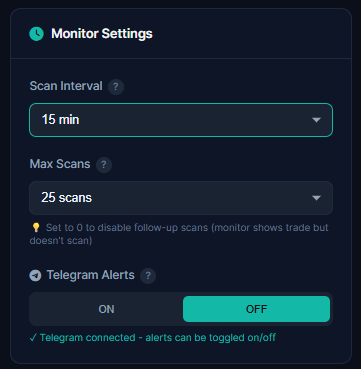
Connecting Telegram to ChartsTrack takes less than two minutes. The monitor settings page includes a dedicated Telegram section where you enter your Chat ID to start receiving alerts immediately.

Once connected, every new trade monitor you activate will automatically send alerts to your Telegram. You can also configure the scan interval from this same settings panel — shorter intervals (5 minutes) mean faster detection of changes, while longer intervals (30-60 minutes) conserve scan credits for swing trades.

  • One-time setup — connect once, receive alerts for all trades
  • Configurable intervals — 5min to 60min scan frequency
  • Always active — alerts work for both AI and manual trades
Monitor settings page for Telegram alerts and scan interval configuration

How to Get Your Telegram Chat ID

Follow these five steps to connect Telegram to ChartsTrack and start receiving instant trade alerts.

Step 1: Open Telegram

Open the Telegram app on your phone or desktop. If you do not have Telegram yet, download it for free from your app store or visit telegram.org. Create an account if you do not already have one.

Step 2: Find @userinfobot

In the Telegram search bar, type @userinfobot and open the conversation. This is an official bot that tells you your Telegram user information. Alternatively, you can search for "User Info Bot" in the bot directory.

Step 3: Get Your Chat ID

Send any message to the bot (even just "hi"). It will immediately reply with your user information, including your Chat ID — a numerical ID that looks something like 123456789. Copy this number.

Step 4: Enter in ChartsTrack Settings

Go to the ChartsTrack dashboard, open Monitor Settings, and paste your Telegram Chat ID in the designated field. Make sure there are no extra spaces before or after the number.

Step 5: Test the Connection

Save your settings and activate a trade monitor. You should receive a confirmation message on Telegram verifying that the connection is working. If you do not receive it, double-check your Chat ID and ensure you have started a conversation with the ChartsTrack bot on Telegram first.

Pro Tip

Create a dedicated Telegram group for trade alerts so they do not get lost in your regular messages. You can add the ChartsTrack bot to a private group and have all trade notifications organized in one place. This also makes it easy to scroll back through past alerts and review your trading history directly in Telegram.

Why Real-Time Alerts Transform Your Trading

Automated Telegram alerts solve the biggest practical problem in active crypto trading.

Sleep While AI Monitors

Enter a trade before bed and wake up to a full history of what happened overnight. Every TP hit, every confidence change, every scan result — all delivered to your Telegram while you slept. No more setting 3 AM alarms to check positions.

Catch Structure Breaks Early

The difference between a small loss and a devastating one is often just a few minutes. Structure break alerts give you the information in real time, so you can act before a minor concern becomes a major reversal against your position.

Celebrate TP Hits Instantly

There is nothing quite like getting a notification that your trade just hit TP1 and profit is locked. These positive reinforcement moments keep you disciplined and motivated. You know your analysis was right — and you did not have to watch it happen in real time.

The fundamental shift that Telegram trading alerts enable is removing the emotional burden of trade monitoring. When you sit and watch every tick of price action, you are prone to panic selling on normal pullbacks or greedily moving your TP further when you should be locking profit. When you receive structured, objective alerts from the AI, you make decisions based on analysis rather than emotion.

This is particularly powerful when combined with ChartsTrack's manual trade monitor. You can enter your own trade setups, activate AI monitoring, and then walk away knowing that Telegram will notify you the moment anything important happens. The combination of your analysis with AI oversight and instant alerts creates a trading workflow that simply was not possible before.

Common Questions About Telegram Alerts

Are Telegram alerts included in all ChartsTrack plans?

Telegram alerts are available on the Basic and Pro plans. The Free tier includes full dashboard monitoring but does not send Telegram notifications. Upgrading to Basic unlocks all 7 alert types so you can stay informed without watching the dashboard. Check our pricing page for current plan details.

How fast are the Telegram alerts delivered?

Telegram alerts are sent within seconds of the event being detected. When the AI completes a monitoring scan and detects a TP hit, structure break, or confidence change, the notification is dispatched immediately via the Telegram Bot API. Delivery time depends on your internet connection and Telegram's servers, but typically alerts arrive within 1-3 seconds of detection.

Can I receive alerts for multiple trades at the same time?

Yes. Each active trade monitor sends its own alerts independently. If you have three trades running simultaneously, you will receive separate Telegram alerts for each one. Every alert includes the token pair and trade direction so you can immediately identify which trade triggered the notification.

Related Articles

Get Instant Trade Alerts on Telegram

Stop checking charts every 5 minutes. Let AI monitor your trades and Telegram deliver the updates that matter.

📚 Related Resources

📝

Test Your Knowledge

Take our 50-question trading quiz and discover your skill level

🔍

Pattern Recognition

Learn how AI detects 20+ chart patterns automatically

🌍

Global Trading Sessions

Track when Asian, London, and NY markets are active